Free Google Sheets Habit Tracker: Solo or With a Friend
This free Google Sheets habit tracker records one monthly habit, including quantities, planned weekdays and optional reports from a friend. A blank means unreported; an entered zero means the person reported doing none. You can review both without treating them as the same result.
The original is view-only. Sign in to Google and choose File → Make a copy to edit your own version. No DuoKeep account or email signup with us is required. A computer is the clearest place to set it up.
Set up your Google Sheets habit tracker
The workbook has two tabs: Review holds your rule, schedule and summaries; Daily log holds the dated reports. It tracks one habit and one numeric completion target. For several unrelated habits, keep separate copies or choose a tracker designed for multiple habits.
- Make a copy and name it for the habit and month, such as “Reading — October 2026.” Google’s copy instructions explain the save-location options.
- On Review, enter a date in your chosen month in B20. The template generates that month’s dates, including February and leap years. Set this before entering amounts.
- Write your completion rule in B22, its unit in B23 and a positive numeric target in B24. For example: “Read at least five pages,” pages, and 5. The formulas use the numeric target; they do not interpret the sentence.
- Enter your name or a label in B25. Leave B26 blank for solo use. Add a second label there only if you want two independent reports under the same rule.
- Set the weekday flags in B31:H31, Monday through Sunday: 1 means planned and 0 means off. At least one weekday must be planned.
For a simple done/not-done habit, use the unit actions and target 1. Enter 1 for completed and 0 for a confirmed miss. If you need help choosing the action, use our habit rule builder before filling the sheet.
Choose the review date and timezone
Review through, cell B21, defaults to =TODAY()-1. It includes yesterday and earlier dates, leaving today open. You can replace the formula with a fixed date when reviewing a particular week.
The public template starts with English (US) formatting and the UTC timezone. In your copy, use File → Settings to choose the timezone you want both people to use. Google’s sheet settings apply to everyone collaborating on that file. Check the displayed review date when you open the sheet; do not assume each person’s local midnight defines a separate reporting day.
Enter amounts, leaving unknown days blank
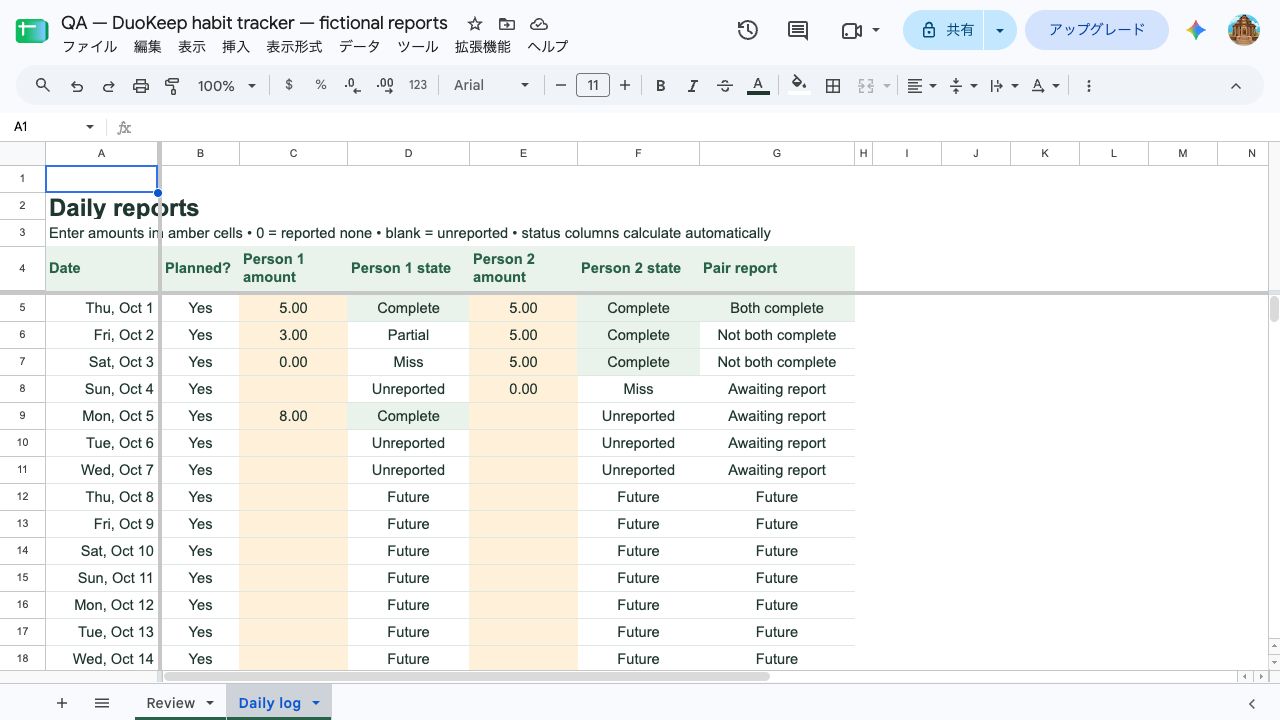
On Daily log, enter your amount in column C. The optional second person uses column E. These amber cells are the daily inputs; dates, planned-day labels and status columns contain formulas.
| Example report | Interpretation | Next adjustment |
|---|---|---|
| 5 or more pages, target 5 | Complete: the reported amount meets the rule. | Keep the actual amount; the template counts one completed day. |
| 3 pages, target 5 | Partial: some action was reported, below the target. | Count the report as known. Discuss whether the next month needs a different rule. |
| 0 pages | Miss: the person explicitly reported doing none. | Keep the zero. It tells you something different from no report. |
| An empty amount cell | Unreported: the sheet does not know what happened. | Ask for the report, or leave it unknown. Do not fill in a zero on the person’s behalf. |
An off-day appears as Not scheduled. A planned date after the review cutoff appears as Future. Amounts entered on either kind of day stay in the grid but are excluded from the current summary.
Text such as “yes,” or a negative number on a reviewed day, produces Check input. Enter a nonnegative number instead. The summary withholds that person’s percentages while an invalid reviewed report remains.
Read the summary: a fictional seven-day example
Suppose two people agree to read at least five pages on each of October 1–7. Person 1 enters 5, 3, 0, blank, 8, blank, blank. Person 2 enters 5, 5, 5, 0, blank, blank, blank. These are made-up reports used to check the template, not a customer trial.
Person 1 has 2 complete, 1 partial, 1 confirmed miss and 3 unreported days. Person 2 has 3 complete, 1 confirmed miss and 3 unreported days. Each has four known reports out of seven planned days, so both show 57% report coverage, rounded.
Recorded complete / planned is 2 ÷ 7, or 29%, for Person 1 and 3 ÷ 7, or 43%, for Person 2. The denominator includes the unreported planned days. Those fractions describe recorded completion; they do not prove the remaining days were failures.
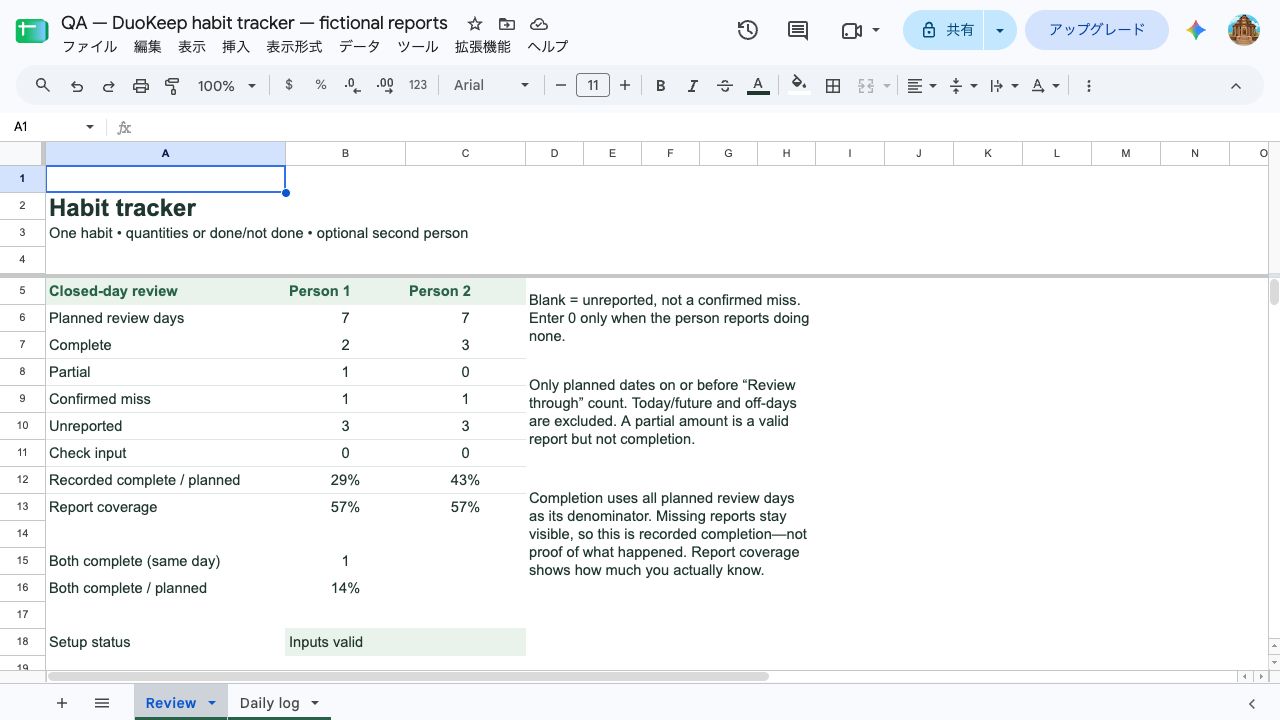
The pair has one day with both complete, October 1. Person 1’s October 5 completion cannot be paired with Person 2’s October 2 completion: they are different dates. A day with either report missing remains Awaiting report, even if the other person reported a miss.
Start the conversation with the missing reports, then look at the known partial or zero amounts. If the rule needs changing, agree on a new one for a fresh record. Lowering the target in this existing sheet would recalculate its old days; it would not show what the original plan achieved.
Use your copy with a friend
Enter the second person’s label on Review B26, then intentionally share your copy with that person as an editor. Keep the public blank template separate. Google’s sharing guide explains editor, commenter and viewer access.
Agree on who uses column C and who uses column E, the shared timezone, and when you will review. Each person should enter their own report. An editor can change other cells too; the two columns are a reporting convention, not separate access controls.
This template gives both people the same target and planned weekdays. If you want different habits, targets or calendars, use separate records. Do not compare percentages whose rules or planned-day denominators differ as if they measured the same thing.
When to keep the sheet—and when DuoKeep fits
Keep the spreadsheet when quantities, selected weekdays or custom summaries matter. It lets you inspect and change formulas, but it needs manual entries and a new monthly copy. This template provides no reminders, streak calculation or automatic archive.
DuoKeep is our app for two people who already know each other and want one common daily action, such as “read at least five pages.” Each person checks in separately and can see the shared goal’s reports. It is a better fit when you want an app’s daily pair workflow instead of maintaining a sheet; the sheet remains the choice for these numeric totals and selected weekdays.
DuoKeep starts free with one active goal per pair, with optional Plus. Its Done, Rest day and unreported states are app features. The spreadsheet’s numeric Partial and Check input labels are template rules, not extra DuoKeep buttons. See the habit-tracker app fit guide if you need a different record or sharing format.

DuoKeep · Habits for two
One goal. Two people.
Start together.
Build a daily habit with a friend or partner. Each person checks in separately, and each pair gets one active goal free.
Free to start. DuoKeep Plus is optional. Store availability and purchase prices vary by country.
Questions and fixes
Why can’t I type into the template?
The public file is intentionally view-only. Sign in to Google and use File → Make a copy. If your organization blocks external files or copying, use an account permitted to access it. You do not need to request editing rights to the public original.
Why do I see “Check inputs” or “n.a.”?
For Check inputs, first check the setup: valid month and review dates, a written rule and unit, a positive numeric target, Person 1’s label, and seven weekday flags containing only 0 or 1 with at least one 1. If setup is valid, check reviewed amounts for text or negative values. n.a. means the optional person is unused or the review includes no planned days; it is not a failed day.
How do I start the next month?
Make a fresh copy of the blank template, name it for the new month, and set its month, rule, target and schedule. Keep the old monthly file. If you copy a filled workbook instead, clear only Daily log C5:C35 and E5:E35 in the new copy before logging. Changing B20 alone relabels existing amounts; it does not archive or erase them.
Can I use it on my phone or print it?
The template’s native Google Sheets calculations and computer layout were checked; mobile app editing and printed pagination were not tested. The grid is wide, so set it up on a computer first. For a paper record, choose the free weekly record sheets for seven days, or the free habit tracker printable for a calendar month or 30 days from your chosen start date. Both offer A4 and US Letter layouts for one person or two independent reports; you record and review by hand.
Does a completion percentage mean the habit is formed?
No. This template calculates reports against your chosen rule and planned dates. It does not measure automaticity or predict when a habit will feel natural. Use the numbers to understand the record and decide what to try next.
If you choose a common daily action and want to try it together in an app, start with one small DuoKeep goal. Keep using the sheet if its quantities and schedule are what you need.
DuoKeep · Habits for two
One goal. Two people.
Start together.
Build a daily habit with a friend or partner. Each person checks in separately, and each pair gets one active goal free.
Free to start. DuoKeep Plus is optional. Store availability and purchase prices vary by country.
Template calculations and native Google Sheets behavior checked October 8, 2026. Example reports are fictional. We publish DuoKeep; read how we write and verify these guides.
More habit guides
Browse our habit guides for choosing an app and planning a goal together.

Habit guide
Goal Tracker Apps: 5 Options by What You Need to Record
Choose a goal tracker app for finished results, assigned tasks or two daily reports. Compare five options, free limits and sharing conditions.
Read the guide
Habit guide
Apps for Couples: Questions, Calendars and Daily Habits
Choose among five apps for couples by the result you want to share, both partners’ access, free limits and the first thing to check together.
Read the guide